Industries & auto-generated defaults
Picking a business type gets you a working setup. Picking an industry within it gets you a setup that already looks like your field — the right pipeline stages, the departments you actually have, and the costs you actually pay. Either way, your space starts pre-populated so you’re not staring at empty lists on day one.
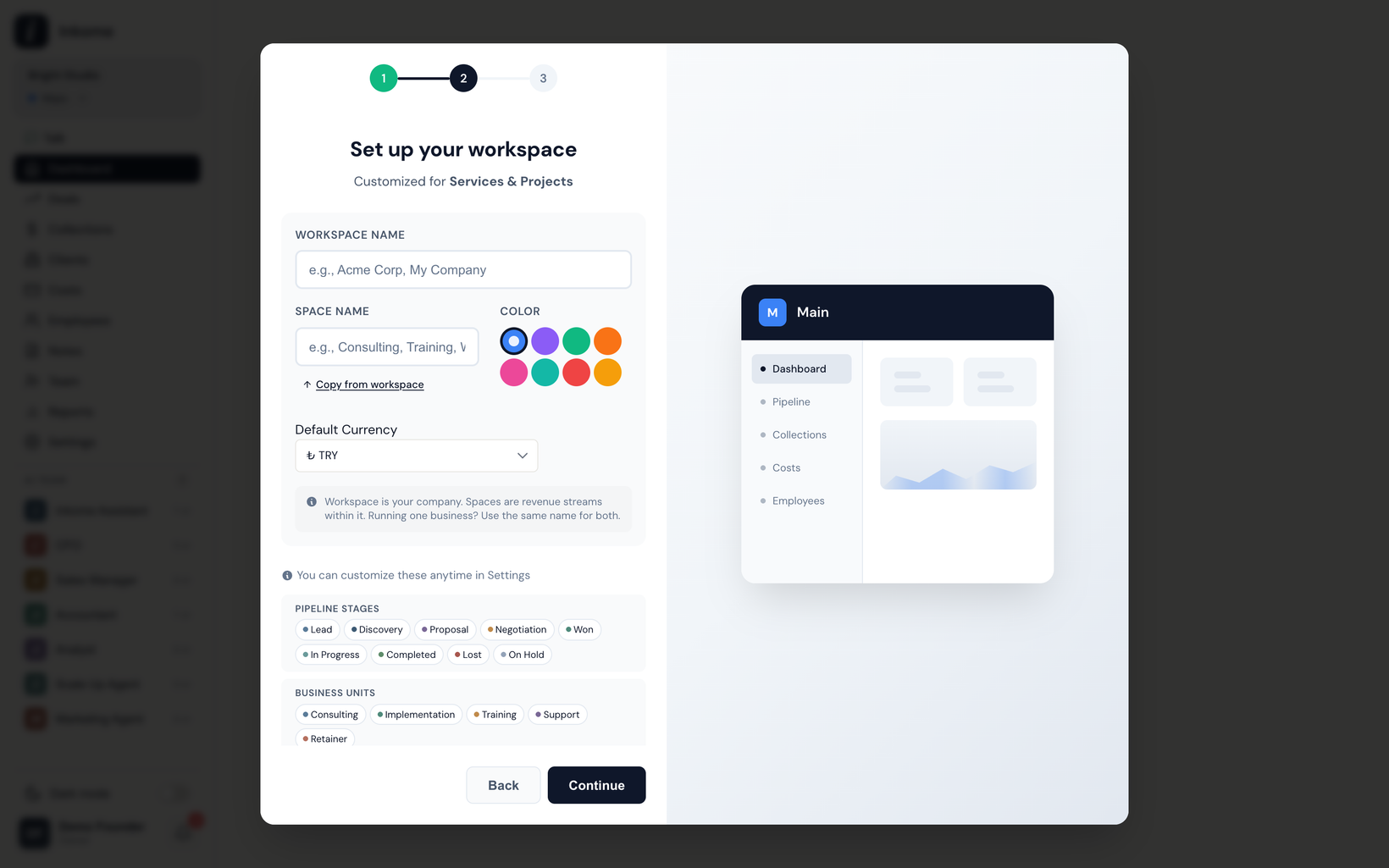
Choosing an industry
During the onboarding wizard, you first pick a business type. From there you can go straight ahead with the type’s general defaults, or choose a more specific industry for a closer fit. Each industry belongs to a parent business type and inherits its vocabulary, while bringing its own tailored stages, units, and cost types.
| Industry | Parent type | For |
|---|---|---|
| Consulting | Services | Management and strategy consulting firms |
| Agency | Services | Creative, digital, and marketing agencies |
| Construction | Services | Construction, renovation, and contracting businesses |
| Professional Services | Services | Law firms, accounting, and professional practices |
| Real Estate | Services | Real estate sales, rentals, and property management |
| Freelance | Services | Independent contractors and solo professionals |
| Content Creator | Digital | YouTubers, podcasters, influencers, and digital creators |
| Manufacturing | E-commerce | Production and B2B manufacturing |
If none fits, the parent business type’s general defaults are always a fine starting point.
What gets auto-created
When the space is created, Inkome generates three sets of records for you, based on the type or industry you picked:
- Stages — the pipeline or lifecycle steps a deal/product moves through (each has a category: active, won, at risk, lost, or inactive). See Stages & categories.
- Units — the departments or channels you split revenue across. See Units.
- Cost types — the categories you’ll group your costs under. See Cost types.
These are starting points, not locks. You can rename, recolor, add, or remove any of them afterward.
Defaults by business type
If you choose a business type without drilling into an industry, you get these.
Services & Projects
| Stages | Units | Cost types |
|---|---|---|
| Lead, Discovery, Proposal, Negotiation, Won, In Progress, Completed, Lost, On Hold | Consulting, Implementation, Training, Support, Retainer | Personnel, Subcontractor, Travel & Expenses, Software & Tools, Office & Admin, Marketing, Professional Insurance |
E-commerce & Retail
| Stages | Units | Cost types |
|---|---|---|
| Active, Low Stock, Out of Stock, Discontinued | Online Store, Marketplace, Wholesale, Retail, Export | Personnel, COGS, Shipping & Logistics, Marketplace Fees, Marketing & Ads, Warehouse, Packaging, Payment Processing |
Digital Products
| Stages | Units | Cost types |
|---|---|---|
| Active, Low Sales, Paused, Discontinued | App Store, Play Store, Web Store, Gumroad/Lemon, Licensing | Personnel, Cloud & Hosting, Software & Tools, Marketing & Ads, Payment Processing, Support, Legal & Compliance |
Subscriptions & SaaS
| Stages | Units | Cost types |
|---|---|---|
| Lead, Trial, Demo, Negotiation, Won, Active, Churned, Paused | Enterprise, Mid-Market, SMB, Self-Serve, Partner/Reseller | Personnel, Cloud & Infra, Software & Tools, Marketing, Sales Commission, Support, R&D, Legal & Compliance |
Defaults by industry
Industries replace the general defaults with a more specific set. A few examples:
Consulting (parent: Services)
| Stages | Units | Cost types |
|---|---|---|
| Initial Contact, Needs Assessment, Proposal Sent, Proposal Review, Contract Negotiation, Engaged, Completed, Lost, On Hold | Strategy, Operations, Digital Transformation, HR & OD, Finance Advisory, Training | Personnel, Subcontractor, Travel & Expenses, Research & Data, Office & Admin, Marketing & BD, Professional Insurance, Training & Certification |
Agency (parent: Services)
| Stages | Units | Cost types |
|---|---|---|
| Brief Received, Pitch Prep, Pitch Delivered, Feedback Pending, Revision, Won, Lost, Paused | Creative, Digital Marketing, Media Buying, Social Media, Production, PR & Communications, Web & Tech | Personnel, Freelancer, Media Spend, Production Costs, Software & Tools, Stock & Assets, Office & Studio, Pitch Expenses |
Content Creator (parent: Digital)
| Stages | Units | Cost types |
|---|---|---|
| Active, Growing, Monetized, Paused, Archived | YouTube, TikTok, Instagram, Podcast, Blog/Newsletter, Twitch | Personnel, Equipment, Software & Tools, Studio/Location, Ads & Promotion, Music & Licensing, Freelancer/Editor, Platform Fees |
Manufacturing (parent: E-commerce)
| Stages | Units | Cost types |
|---|---|---|
| RFQ Received, Costing, Quote Sent, Sample/Prototype, PO Received, In Production, Shipped, Lost, On Hold | OEM, Private Label, Direct Sales, Distributor, Export | Personnel, Raw Materials, Machinery & Maintenance, Utilities, Logistics, Quality Control, Facility Rent, Compliance & Certification |
The remaining industries — Construction, Professional Services, Real Estate, and Freelance — each ship their own equivalent sets, all under the Services parent type.
After setup
None of this is permanent. Once your space exists, head into the relevant pages to adjust:
- Add or edit pipeline steps in Stages & categories.
- Reshape your departments and channels in Units.
- Tune your cost categories in Cost types.
The defaults exist to save you the blank-page problem — keep what fits, change what doesn’t.
Prev: Dynamic terminology Up: User guide index