The dashboard
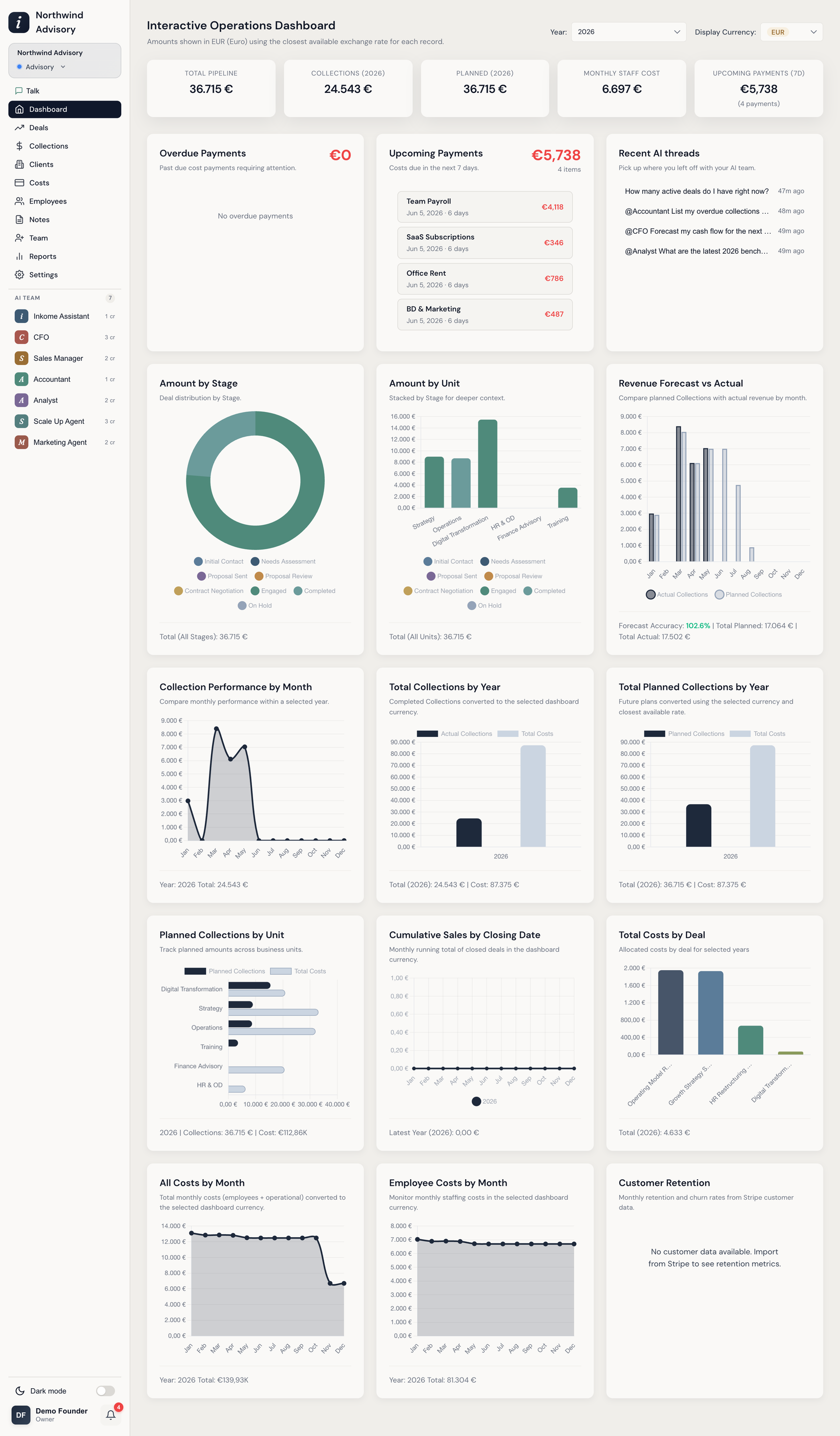
The dashboard is where the triangle comes together on one screen — Revenue, Cash, and Costs side by side, so you can see where the business stands without opening four tabs. It’s the first thing you land on, and every number on it follows the space you’re in.
How the dashboard reads your data
A short bar at the top of the dashboard reminds you that amounts are shown in the selected currency using the closest available exchange rate for each record. You control three things from the dashboard controls:
| Control | What it does |
|---|---|
| Currency | Converts every figure to one currency (TRY, USD, or EUR) so mixed-currency data compares cleanly. Your choice is remembered. |
| Stage | Narrows the pipeline widgets to a single stage, or ALL. |
| Unit | Narrows to a single unit, or ALL. |
Several widgets also have their own year selector so you can step back through history.
The summary cards
The row of cards at the top is the quick pulse of the business:
- Total Pipeline — the value of open deals: records on a stage whose category is active or at risk, with won, lost, inactive and excluded stages left out. It follows the year selector — pick a year and each deal contributes what it’s planned to bring in that year; pick All Years and each contributes its full amount.
- On All Years, a second line says how much of that pipeline has a close date in the selected year, so a large deal closing three years out doesn’t read as this year’s business. Deals with no close date count in the headline figure but not in that line. With a specific year selected the headline is that figure, so the line stays empty.
- Collections (This Year) — what’s actually come in, in the selected currency.
- Planned (This Year) — what your collection plans say you’ll bring in. On a SaaS space it’s labelled Total ARR, because “this year’s plans on won accounts” is exactly what ARR means. See the rule below.
- Avg Monthly Cost — the selected year’s total cost, staff plus operational, divided by twelve, so one-off and annual costs read as a run-rate instead of spiking in one month.
- Upcoming Payments (7d) — cost payments due in the next seven days.
Every card carries a small help icon that spells out its exact formula for your business type — worth a click when a number surprises you. For the full rules per business type, with a worked example, see How the summary cards add up.
The three money cards measure things that don’t overlap — unwon work, money received, money expected — and they measure the same things in every business type. That’s what makes All Spaces equal the sum of the spaces it summarizes. Each card used to mean something different depending on the space’s type, so a combined view couldn’t be reconciled against the spaces underneath it.
What counts as “planned”
Planned revenue used to be every collection-plan row for the year, whatever state the deal behind it was in. That let plans typed onto a lead, or parked on a stage the organization had explicitly excluded, sit in the same total as signed work — one space read 347K where 158K of it belonged to deals nobody expected to collect.
Planned now follows two rules, and so do the Total Planned Collections by Year and Planned Collections by Unit widgets:
- Only deals on a stage category you allow collections against count — the Collection stages setting, Revenue Active by default. See Custom labels & terminology. A three-year plan typed onto a Lead stays a probability rather than a forecast. Leaving the setting empty is a no-op, not a zeroed forecast.
- Plans on an excluded stage are dropped, and the card honors the stage filter alongside the unit one.
Excluded stages are listed by name and hold in every space and in All Spaces. Collection stages, by contrast, are written as stage categories, because that setting belongs to the organization while stage names belong to a single space — see How the summary cards add up for why that distinction matters.
On SaaS this card is labelled Total ARR. Same measurement, name the business already uses for it: this year’s plan rows on won accounts. Its neighbour, Open Pipeline, holds the accounts still to be won. The two are disjoint and add up to the year’s full outlook.
The widgets
Below the cards, the dashboard is a grid of chart widgets. The full set includes:
| Widget | What it shows |
|---|---|
| Overdue Payments | Past-due cost payments needing attention. |
| Upcoming Payments | Costs due in the next 7 days. |
| Amount by Stage | Deal value distributed across pipeline stages. |
| Amount by Unit | Value per unit, stacked by stage for deeper context. |
| Revenue Forecast vs Actual | Planned collections against actual revenue, by month, with a forecast-accuracy figure. |
| Collection Performance by Month | Monthly collection performance within a selected year. |
| Total Collections by Year | Completed collections per year, converted to the selected currency. |
| Total Planned Collections by Year | Future planned amounts per year. |
| Planned Collections by Unit | Planned amounts across business units. |
| Cumulative Sales by Closing Date | A running monthly total of closed deals. |
| Total Costs by Deal | Allocated costs per deal across the selected years. |
| All Costs by Month | Total monthly costs (staff plus operational). |
| Employee Costs by Month | Monthly staffing costs. |
| Customer Retention | Monthly retention and churn rates. |
Picking a year doesn’t hide your open deals
Amount by Stage and Amount by Unit used to read only from collection plans once you selected a specific year. Plans in practice get entered after a deal is won, so every open deal disappeared from those charts — a space whose plans all sat on won stages showed a single-slice donut while its deals sat right there in Proposal and Negotiation.
Now each deal contributes exactly once. A deal with plans reports its plans year by year, so a multi-year deal isn’t flattened onto a single year. A deal with no plans falls back to its own amount, placed in its close-date year. A deal with no close date has no year to belong to and stays out.
Widgets adapt to your business type
The dashboard isn’t fixed — it surfaces what matters for the kind of stream you’re running. The labels shift with your business type (a card reading Collections in a services space reads differently in a product space, via dynamic terminology), and some widgets only appear where they make sense — for example, the Customer Retention widget is built around recurring-revenue data. So two spaces of different types won’t show an identical dashboard.
Want the data, not the chart?
Every chart is a starting point. To pull the underlying records into a spreadsheet, use export. For an AI-written narrative built on top of these numbers — with insights and commentary — see Reports.
Prev: Payment history & bulk payments Next: How the summary cards add up Up: User guide index