Business-type terminology matrix
This is the authoritative, label-by-label reference for how Inkome’s vocabulary changes across the four business types. Other pages link here for the full picture; if a label on a page and a label here ever disagree, this table wins. A dash (—) means the field is hidden or not applicable for that type.
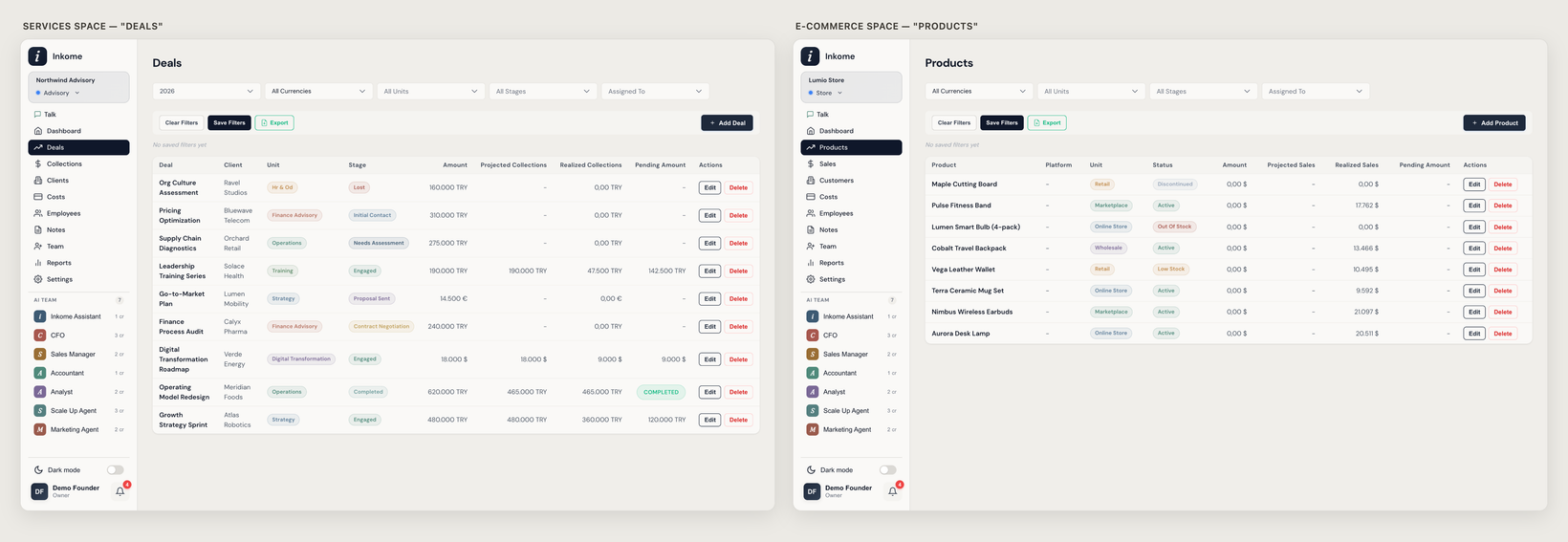
Core records
The two records every space revolves around — the thing you sell, and the money it brings in.
| Concept | Services & Projects | E-commerce & Retail | Digital Products | Subscriptions & SaaS |
|---|---|---|---|---|
| The thing you track | Deal | Product | Product | Plan |
| (plural) | Deals | Products | Products | Plans |
| Money coming in | Collection | Sale | Sale | Invoice |
| (plural / section name) | Collections | Sales | Sales | Revenue |
| The customer | Client | Customer | — (Customers) | Account |
| Stage label | Stage | Status | Status | Status |
| The pipeline view | Pipeline | Catalog | Catalog | Plans |
| The value figure | Deal Value | Revenue | Revenue | MRR |
| Close/launch date | Close Date | — | — | — |
| Platform/store label | Platform | Platform | Store | Billing Provider |
Navigation
The two primary nav items each type shows.
| Services | E-commerce | Digital | SaaS | |
|---|---|---|---|---|
| Primary nav | Deals | Products | Products | Plans |
| Secondary nav | Collections | Sales | Sales | Revenue |
Action labels
| Action | Services | E-commerce | Digital | SaaS |
|---|---|---|---|---|
| Add record | Add Deal | Add Product | Add Product | Add Plan |
| Edit record | Edit Deal | Edit Product | Edit Product | Edit Plan |
| Record income | Add Collection | Record Sales | Record Sales | Record Invoice |
| Edit income | Edit Collection | Edit Sale | Edit Sale | Edit Invoice |
| Income date | Collection Date | Payment Date | Payout Date | Invoice Date |
| Empty state | “No deals yet” | “No products yet” | “No products yet” | “No plans yet” |
The plan (planned income)
The forecast schedule, relabeled per type. See Collection plans.
| Services | E-commerce | Digital | SaaS | |
|---|---|---|---|---|
| Plan name | Collection Plan | Sales Plan | Sales Plan | Revenue Plan |
| Copy action | Copy from Collection Plan | Copy from Sales Plan | Copy from Sales Plan | Copy from Revenue Plan |
| Plan empty-state title | Plan Your Collections | Plan Your Sales | Plan Your Sales | Plan Your Revenue |
One behavioral difference worth knowing. For most types a plan’s total can’t exceed the deal value (Inkome blocks the save). SaaS is the exception — because its figure is MRR, a Revenue Plan legitimately sums to far more across months, so the over-total check is skipped. See Collection plans.
Dashboard labels
The same widgets, relabeled — the labels differ, the maths behind them does not. See How the summary cards add up.
| Widget concept | Services | E-commerce | Digital | SaaS |
|---|---|---|---|---|
| Pipeline card | Total Pipeline | Open Orders | Open Pipeline | Open Pipeline |
| Planned card | Planned | Planned | Planned | Total ARR |
| By stage/status | Amount by Stage | Products by Status | Products by Status | ARR by Status |
| By unit | Amount by Unit | Revenue by Category | Revenue by Category | ARR by Tier |
| Cost-by-record | Total Costs by Deal | Total Costs by Product | Total Costs by Product | Total Costs by Plan |
Record form fields (which appear)
The fields shown on the opportunity (deal/product/plan) form, by type. ✓ = shown.
| Field | Services | E-commerce | Digital | SaaS | Notes |
|---|---|---|---|---|---|
| Client / Account name | ✓ | — | — | ✓ | Labeled Client Name (services), Account (SaaS) |
| Close / launch / start date | ✓ | — | — | — | Close Date (services only) |
| Platform / Store | — | ✓ (required) | ✓ (required) | — | Platform / Store |
| Unit price | — | ✓ | ✓ | ✓ | Unit Price / Price / Monthly Price |
| Quantity | — | — | — | — | Stock / Downloads / Seats (defined but hidden) |
| Commission rate | — | ✓ | ✓ | — | Commission Rate / Store Commission |
Income form fields (which appear)
The fields shown on the collection / sale / invoice form, by type. ✓ = shown.
| Field | Services | E-commerce | Digital | SaaS | Label by type |
|---|---|---|---|---|---|
| Platform / Store | — | ✓ | ✓ | — | Platform / Store |
| Gross amount | — | ✓ (required) | ✓ (required) | — | Gross Sales / Gross Revenue |
| Commission | — | ✓ | ✓ | — | Platform Commission / Store Commission |
| Shipping / fees | — | ✓ | — | — | Shipping Costs |
| Refunds | — | ✓ | ✓ | ✓ | Returns/Refunds · Refunds · Refunds/Chargebacks |
| Units sold | — | ✓ | ✓ | — | Units Sold / Downloads/Sales |
| Period range | — | ✓ | ✓ | — | Sales Period / Payout Period |
| Revenue type | — | — | ✓ | — | Digital only |
Services and SaaS keep their income forms simple — most of the gross/commission/shipping breakdown is for product sellers.
Default stages per type
The starter stages each type ships with when you don’t pick a specific industry. (The onboarding service may seed a slightly fuller set; these are the type’s core lifecycle.)
| Type | Default stages (category) |
|---|---|
| Services | Discovery (active), Proposal (active), Negotiation (active), Closed Won (won), Closed Lost (lost) |
| E-commerce | Active (won), Low Stock (at risk), Out of Stock (inactive), Discontinued (lost) |
| Digital | Development (active), Published (won), Featured (won), Removed (lost) |
| SaaS | Trial (active), Active (won), Past Due (at risk), Churned (lost) |
Services is the only type with a true sales Pipeline and a Close Date. The others are product/subscription lifecycles — a record is “active” rather than “won”, with no close date. For the full per-industry stage/unit/cost-type sets, see Industries & auto-generated defaults.
Prev: Glossary Next: Changelog Up: User guide index