Meet the agents
The AI assistant isn’t one bot — it’s a team. Each agent is a specialist with its own focus, its own data it can reach, and its own per-message credit cost. You can let Inkome route to the right one automatically, or call one by name with an @mention.
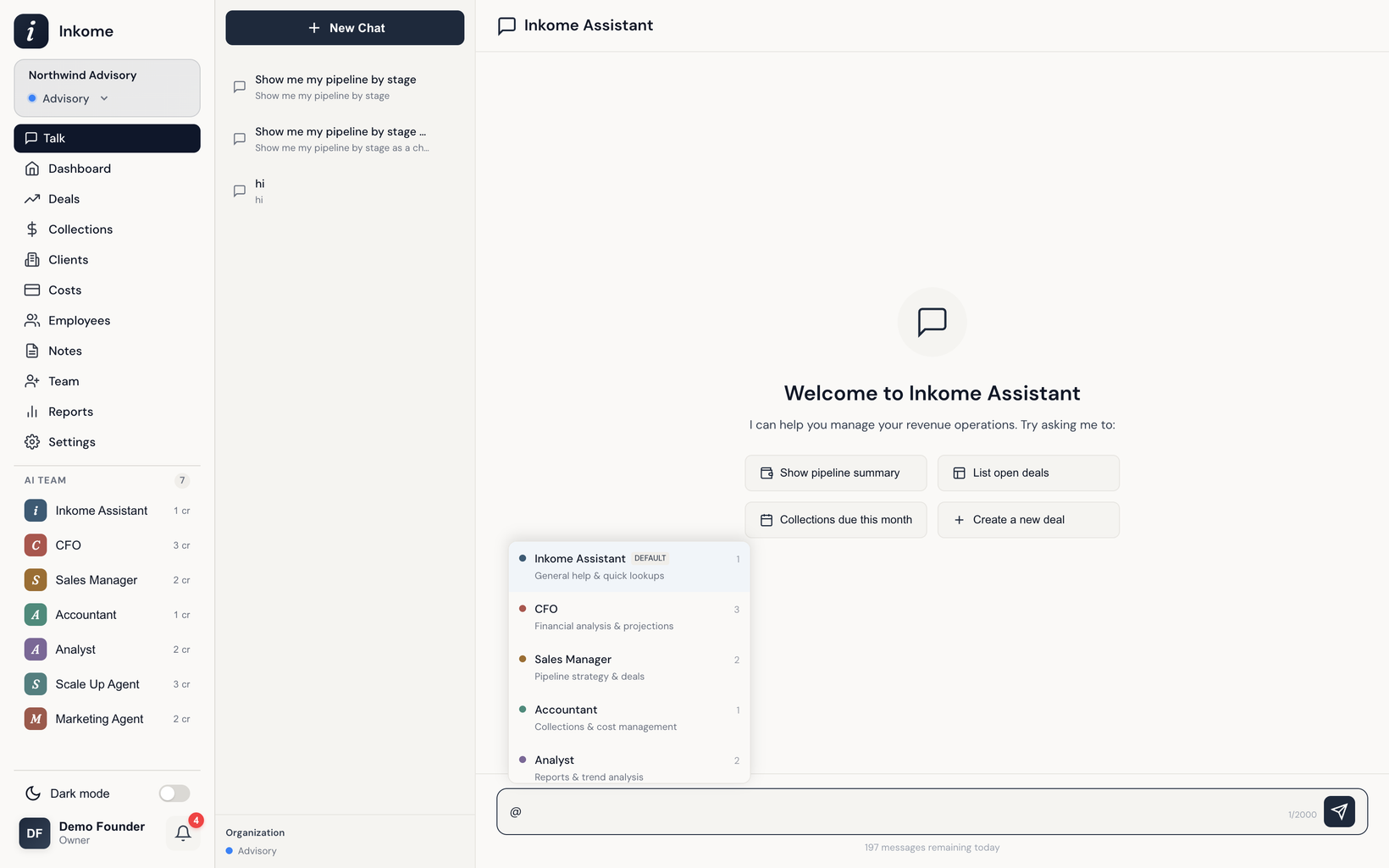
The roster
| Agent | Credits | Specialty |
|---|---|---|
| 🎯 Inkome Assistant | 1 | Your front-desk assistant. Handles general questions and simple data lookups, and routes anything specialized to the right teammate. This is the default agent. |
| 💰 CFO | 3 | Strategic financial analysis — projections, scenarios, cash flow, runway, and multi-step calculations with verified results. |
| 📊 Analyst | 2 | Reports, trends, and comparisons. Turns your data into insight. |
| 🎯 Sales Director | 2 | Pipeline health, deal velocity, and sales performance. (Internally the Sales Manager agent; you’ll see and mention it as Sales Director.) |
| 📋 Accountant | 1 | Collections, payments, and invoices — who owes what and what’s due. Can record and update costs and payments. |
| 🚀 Scale Up | 3 | Growth strategist for founders scaling their operations. |
| 📣 Marketing Agent | 2 | Marketing strategist for campaigns, channels, and customer insight. |
What each agent can touch
Agents aren’t all-powerful — each has a deliberate scope, so the right specialist handles the right job:
- Inkome Assistant can read across your data and create, update, or delete deals, but it hands off heavy financial modeling, report generation, and cost/payment management to the specialists.
- CFO runs financial snapshots, scenarios, and projections, and can draw charts — but it leaves deal editing to the Sales Director.
- Analyst generates reports and comparisons; it reads data but doesn’t edit deals.
- Sales Director owns the pipeline: it can create, update, and delete deals.
- Accountant manages costs and payments — recording costs, marking payments paid, and generating payment schedules.
Working with your notes
Beyond reading your numbers, the assistant can read and write your notes and follow-ups. It can:
- Read note history — pull the notes on a specific deal, cost, or employee, or scan a recent cross-record feed for context before answering (“what’s the latest on the Acme deal?”).
- Build a follow-up agenda — list your open follow-ups, split into overdue and upcoming, so a question like “what do I need to follow up on this week?” returns a ready-made to-do list. Completed follow-ups are left out.
- Add a note — log an update against a record on your behalf, optionally with a follow-up date (“add a note that they pushed the start date to June, remind me next Monday”). Notes are append-only, so the assistant adds a new entry — it never overwrites what’s there.
Availability depends on your plan
Not every agent is on every plan. The Inkome Assistant is available to everyone, the four core specialists unlock on the Maker plan, and the Scale Up and Marketing agents are part of the top plan. The exact mapping is in Credits & limits, and you can also enable, disable, rename, or adjust the personality of agents for your organization in settings.
Prev: The AI assistant Next: Mentions, routing & delegation Up: User guide index